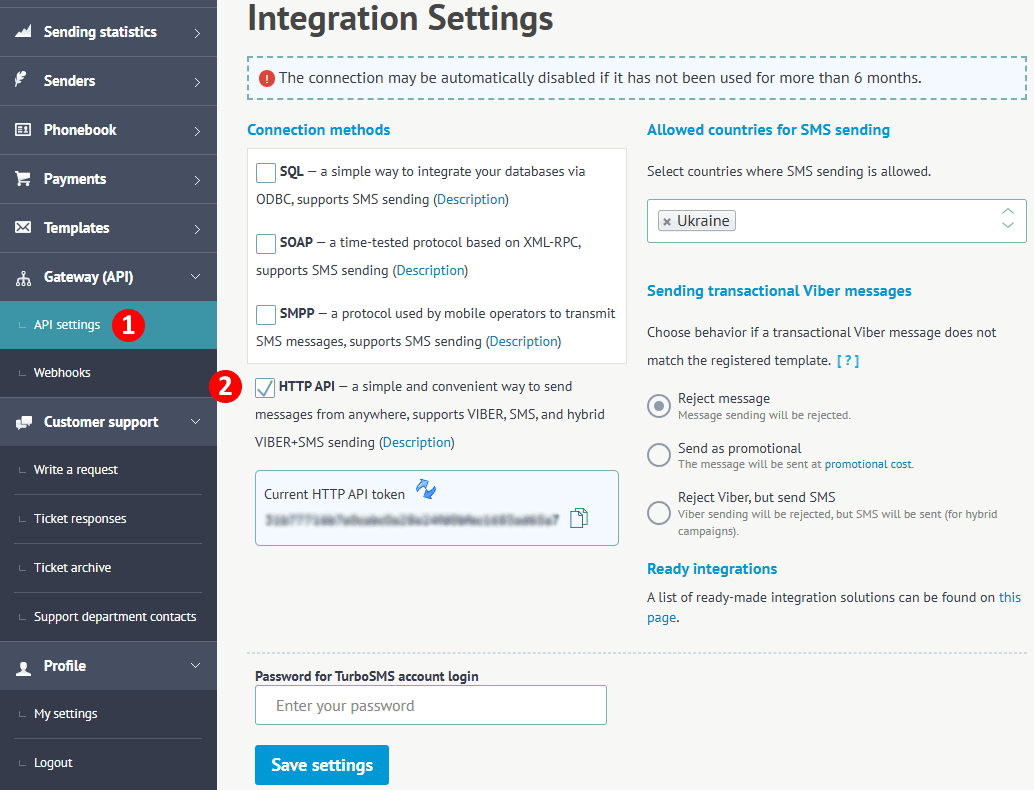
In order to work with our API, you must enable the "HTTP API" option in the API settings section under “Connection Methods.” After that, a unique authentication key will be created, which you can change at any time.
All requests must be sent to a URL of the form https://api.turbosms.ua/module/method.format, where the module/method corresponds to the API command available for invocation, and the format specifies the type of returned data. Currently, the response is only supported in JSON format. If you need a response in XML format or any other data format, please contact our support team, and we will add its support. Specifying the format is not mandatory, but we recommend always including it so that there won’t be any issues in the future if we change the default format. Currently, the default format is JSON.
Each request must include the authentication key. It can be passed in several ways:
Data can also be sent in several ways:
Please note that you can only transmit data in one way within a single request. For example, you cannot pass part of the data as GET parameters and another part as JSON.
Important! All JSON examples in this documentation are split into multiple lines for clarity, but in real interaction with the API, all JSON data must be in a single line. If you need to insert a line break in any value, use the \n character combination.
For any valid HTTP request, the API will always return an HTTP 200 status code. The overall response structure is as follows:
{
   "response_code": 0,
   "response_status": "OK",
   "response_result": null
}Each module includes a ping method to test the API status, which returns the following response:
{
   "response_code": 1,
   "response_status": "PONG",
   "response_result": null
}
If you receive this response, it means the API is operating correctly and can be used.
If you need a request to be executed only once, you can add the parameter sequence_id, which contains your unique request identifier. This parameter can contain up to 40 characters. If a request with the same identifier has already been executed within the last 30 days, the results of its execution will be returned, and the request will not be executed again. The response code will be FAILED_DUPLICATE_REQUEST. This parameter is not mandatory but is recommended for use when creating entity requests. Note that the request identifier is tied to a specific API method, meaning you can call another method with the same sequence_id.
The module allows you to manage messages, such as creating campaigns, sending them, and checking delivery statuses. Its functionality will be expanded.
Example request URL:
https://api.turbosms.ua/message/send.json
The method allows you to send SMS and Viber messages, as well as supports hybrid Viber sending (if the message is not delivered via Viber, it will automatically be sent via SMS).
General structure of the request body:
{
   "global_parameter_1": "value",
   "global_parameter_2": "value",
   ...
   "global_parameter_X": "value",
   "recipients": [
      "recipient_1",
      "recipient_2",
      ...
      "recipient_X"
   ],
   "group_ids": [
      "group_id_1",
      "group_id_2",
      ...
      "group_id_X"
   ],
   "viber": {
      "local_viber_parameter_1": "value",
      "local_viber_parameter_2": "value",
      ...
      "local_viber_parameter_X": "value"
   },
   "sms": {
      "local_sms_parameter_1": "value",
      "local_sms_parameter_2": "value",
      ...
      "local_sms_parameter_X": "value"
   }
}
Depending on the type of message you want to send, the request body should include parameters viber or sms, or both for hybrid sending. When creating a message, global parameter values are used first, but they can be overridden with local parameters if needed. For example, you can specify a global parameter text, and if both viber and sms parameters are present, its value will be used for both Viber and sms messages. If a different text value is specified in the sms parameter, it will be used for sms. Thus, if the parameter value is the same for both message types, it can be specified only in global parameters without duplicating it in local ones.
Attention!
Do not set a timeout on HTTP requests for sending messages, as our server will fully process your request upon receiving it. However, you will not receive a response with message IDs and may attempt to resend the message, resulting in duplicates of already sent messages.
| Parameter | Usage | Data Type | Required | Description |
|---|---|---|---|---|
| sender | sms and viber | string(25) |  |
The sender name from which the message will be sent (alpha name for SMS or sender for Viber). The sender must be activated in your account. |
| start_time | sms and viber | datetime |  |
Deferred sending date and time, supports multiple ISO formats. The recommended format is YYYY-MM-DD HH:MM. The date should not exceed 14 days from the current moment. Do not pass this parameter if the message needs to be sent immediately. |
| start_date | sms and viber | datetime | |
A synonym for the start_time parameter, added for convenience. |
| text | sms and viber | string(1000) | |
Message text. For Viber, up to 1000 characters; for SMS, up to 1521 characters in Latin or 661 characters in Cyrillic text (10 segments). UTF-8 encoding is supported. |
| pattern_id | sms / viber | integer | |
ID of the registered pattern the message is sent by. |
| recipients | sms and viber | array |  |
Message recipients in international format (380XXXXXXXXX). The parameter must always be passed as an array, even if there is only one recipient. No more than 5000 recipients are allowed in a single request. |
| recipients_vars | sms and viber | object | |
Message recipients with the variable values bound to them for substitution into the pattern. Passed as an object with all the data (see the details below). |
| group_ids | sms and viber | array | |
The IDs of the phone groups containing the recipients to whom the message will be sent. This parameter must always be provided as an array, even if there is only one group. There is no limit on the number of groups, but keep in mind that the more recipients there are in the groups, the longer it will take to process the request, which may exceed the timeouts set on both your end and ours. |
| is_flash | sms | boolean | |
Flag for flash messages (1 - yes, any other value or absence of this parameter - no). |
| ttl | viber | integer | |
Message lifetime, during which it will be delivered. If the message is not delivered within this time, it will be marked as undelivered. Specified in seconds, values between 30 and 86400 are allowed, with a default of 86400. |
| hybrid_ttl | sms | integer | |
The lifetime of the hybrid message itself. The countdown begins from the moment the message is created or the scheduled send time, if specified. For example, if hybrid_ttl seconds have already passed since the Viber message was created or sent, then the SMS will not be created. If hybrid_ttl is missing, then the SMS will be created once it becomes known that the Viber message was not delivered. |
| image_url | viber | string | |
The URL of the image that will be displayed in the message. |
| caption | viber | string(30) | |
Text on the button in the message. |
| action | viber | string | |
The URL the recipient will be redirected to upon clicking the button. |
| file_id | viber | integer | |
ID of the file returned by the file/add method. |
| count_clicks | viber | boolean | |
Click-through statistics flag (1 - statistics will be kept, any other value or absence of this parameter - no). |
| is_transactional | viber | boolean | |
Transactional message flag (1 - yes, any other value or absence of this parameter - no). |
| carousel | viber | array | |
Array with product cards carousel data, detailed description in the table below. |
| survey | viber | array | |
The array with survey data, it must contain at least two elements with answer options. |
At least one of the recipients, recipients_vars and group_ids parameters must be present; passing recipients and recipients_vars in the same request is not allowed; all duplicate recipients will be ignored.
If no delayed sending time is specified and the created distribution has no more than 5 recipients, the messages will be sent immediately. This means you will only receive a response after these messages have been processed, which may cause some delay in receiving a response. If it is important for you to receive a response as soon as possible, specify a delayed send time, and the message will be queued and sent in a different thread. Viber messages are sent as promotional by default if the is_transactional parameter is not set.
All transactional messages sent to Ukrainian numbers must match pre-registered templates.
If no suitable template is found when sending a transactional message, it will be rejected with the code NOT_ALLOWED_MESSAGE_TRANSACTION_PATTERN. There may be situations where a template is found by our system but, for some reason, Viber does not find it on their side. In such a case, the message will be charged at the promotional rate. We strive to identify such cases so that our clients can promptly make changes to the template and get the transactional message rate.
Using the file_id parameter, you can send files to users, such as documents, invoices, and so on. To send a file, you need to pass the
caption parameter together with file_id, where you can specify the file name, for example, "Invoice.pdf". This parameter can contain up to
25 Latin characters or up to 12 Cyrillic characters. The text, button, and image parameters must not be present.
The following file formats are supported: .doc, .docx, .rtf, .dot, .dotx, .odt ,odf, .fodt, .txt, .info,
.pdf, .xps, .pdax, .eps, .xls, .xlsx, .ods, .fods, .csv, .xlsm, .xltx. Such messages are charged at the promotional rate.
You can also use file_id to send an image or a link on a button. For an image, simply specify the file_id of the corresponding image, in which case the image_url parameter will be ignored. If the caption parameter is specified and the action parameter is missing, the file will be sent as a link on a button. Such messages are charged at the promotional rate.
Please note that in a message with a poll, the text field can contain up to 85 characters, and the answer option can contain up to 50 characters. Surveys are charged as transactional messages; the is_transactional parameter has no effect and is simply ignored. You can specify between 2 and 10 answer options.
Using the recipients_vars parameter, you can create messages by a certain pattern with variables, where personal values are substituted for each recipient. You can specify the pattern itself in the text parameter, using combinations like %1% as variables (from %1% to %8% are allowed), where 1 is the key of the variable whose value is taken from the recipients_vars parameter. This parameter must be an object with the following structure:
{
  "380XXXXXXXXX": {
    "1": "value_1",
    "2": "value_2",
    "3": "value_3"
  },
  "380YYYYYYYYY": {
    "1": "value_1",
    "2": "value_2",
    "3": "value_3"
  }
}
You can also specify the id of your activated pattern in the pattern_id parameter, then the pattern text will be taken from it. Please note that when this parameter is used, not only the pattern text but also all the other fields filled in it (sender, button, image, carousel cards, survey items) are taken from the pattern. Thus, it may be enough to pass only the recipients_vars and pattern_id parameters in the request. The value of the is_transactional parameter is formed automatically based on the type of the passed pattern.
If necessary, you can replace the values of the pattern fields with other values (for example, use a different link on the button of a Viber message pattern or send the message from a different sender); in that case pass the needed parameter in the request.
Please note that replacing the text and the sender is not allowed in transactional Viber patterns. Currently, sending by a pattern does not support hybrid messages.
To send a message with a carousel of product cards, you need to pass an array of card objects, each of which contains: a title, image, caption, and URL of the main button, as well as the text and URL of an additional link.
| Parameter | Data Type | Required | Description |
|---|---|---|---|
| title | string(38) | |
Product card title. |
| image_url | string | |
URL address of the product card image. |
| file_id | integer | |
The id of the product card image file returned by the file/add method. |
| button_caption | string(10) | |
Text placed on the main button. |
| button_url | string | |
The URL address where the recipient of the message will be redirected when they click on the button. |
| link_caption | string(12) | |
Additional text displayed as a link. |
| link_url | string | |
The URL address where the recipient of the message will be redirected when they click on the link. |
You can use either image_url or file_id as the image; one of them must be present. The recommended image size is 215x185 pixels. A single carousel post can contain 2 to 5 product cards and is charged as an promotional message.
In response to a create message request, the server will return data with the following structure:
{
   "response_code": 802,
   "response_status": "SUCCESS_MESSAGE_PARTIAL_ACCEPTED",
   "response_result": [
      {
         "phone": "recipient_1",
         "response_code": 406,
         "message_id": null,
         "response_status": "NOT_ALLOWED_RECIPIENT_COUNTRY"
      },
      {
         "phone": "recipient_2",
         "response_code": 0,
         "message_id": "f83f8868-5e46-c6cf-e4fb-615e5a293754",
         "response_status": "OK"
      }
   ]
}
Here, the global parameters response_code and response_status contain the overall result of processing the request, and the response_result parameter returns an array of objects, each of which contains the result of processing a specific recipient from the request. The message_id parameter contains a unique identifier of the message by which you can retrieve the current delivery status. If it is impossible to send a message to that recipient, the message_id parameter will be null, and the response_code and response_status parameters will provide error information.
Sending an SMS, JSON POST request:
{
   "recipients": [
      "380678998668",
      "380503288668",
      "380638998668"
   ],
   "sms": {
      "sender": "TurboSMS",
      "text": "TurboSMS welcomes you!"
   }
}
The same data, GET request:
https://api.turbosms.ua/message/send.json?recipients[0]=380678998668&recipients[1]=380503288668&recipients[2]=380638998668&sms[sender]=TurboSMS&sms[text]=TurboSMS+welcomes+you%21&token=AUTH_TOKENSending a Viber message:
{
   "recipients": [
      "380678998668",
      "380503288668",
      "380638998668"
   ],
   "viber": {
      "sender": "TurboSMS",
      "text": "TurboSMS welcomes you!"
   }
}
Hybrid sending of Viber:
{
   "recipients": [
      "380678998668",
      "380503288668",
      "380638998668"
   ],
   "group_ids": [
      "15",
      "23"
   ],
   "viber": {
      "sender": "TurboSMS",
      "text": "TurboSMS welcomes you on Viber!"
   },
   "sms": {
      "sender": "TurboSMS",
      "text": "TurboSMS welcomes you on SMS!"
   }
}
Hybrid sending of Viber with a limited message lifetime:
{
   "recipients": [
      "380678998668"
   ],
   "viber": {
      "sender": "TurboSMS",
      "text": "Your confirmation code: 4821",
      "ttl": 60
   },
   "sms": {
      "sender": "TurboSMS",
      "text": "Your confirmation code: 4821",
      "hybrid_ttl": 60
   }
}
In this example, we will wait up to 1 minute for the Viber message to be delivered, and the fallback SMS will be sent only if the Viber message is rejected immediately (the subscriber is not registered, has unsubscribed, etc.). If we do not receive a successful delivery status for the Viber message within 1 minute, the SMS will not be sent because the hybrid_ttl has already expired. This approach is useful for messages that become less relevant over time, such as one-time codes.
Sending an SMS at a specified time:
{
   "start_time": "2020-03-08 10:00",
   "recipients": [
      "380678998668"
   ],
   "sms": {
      "sender": "TurboSMS",
      "text": "Maksym, happy birthday!"
   }
}
Sending a file in Viber:
{
   "recipients": [
      "380678998668"
   ],
   "viber": {
      "sender": "TurboSMS",
      "file_id": 12345,
      "caption": "Contract.pdf"
   }
}
Sending a file as a link on a button in a Viber message:
{
   "recipients": [
      "380678998668"
   ],
   "viber": {
      "sender": "TurboSMS",
      "text": "An invoice of 1000 hryvnias has been issued for your order №12345.",
      "file_id": 23456,
      "caption": "Download Invoice"
   }
}
Sending a carousel of product cards in a Viber message:
{
   "recipients": [
      "380678998668"
   ],
   "viber": {
      "sender": "Super FOOD",
      "text": "Only today, on your birthday, we are giving you one of the dishes you ordered most often:",
      "carousel": [
         {
           "image_url": "https://www.willcookforsmiles.com/wp-content/uploads/2025/02/Avocado-salmon-rice-bowl-in-a-bowl.jpg",
           "title": "Bowl with avocado and salmon",
           "button_caption": "I want it!",
           "button_url": "https://super-food.com/order/birthday/bowl-avocado-salmon.html",
           "link_caption": "More details",
           "link_url": "https://super-food.com/bowls/bowl-avocado-salmon.html"
         },
         {
           "file_id": 123456,
           "title": "Tempura vegetables with shrimp",
           "button_caption": "Or this!",
           "button_url": "https://super-food.com/order/birthday/tempura-vegetables-shrimps.html",
           "link_caption": "More details",
           "link_url": "https://super-food.com/tempura/tempura-vegetables-shrimps.html"
         },
         {
           "file_id": 234567,
           "title": "Dragon Roll Platter",
           "button_caption": "Definitely",
           "button_url": "https://super-food.com/order/birthday/set-dragon-rolls.html",
           "link_caption": "More details",
           "link_url": "https://super-food.com/sets/set-dragon-rolls.html"
         }
      ]
   }
}
Sending a Viber message with a survey:
{
   "recipients": [
      "380678998668",
      "380503288668",
      "380638998668"
   ],
   "group_ids": [
      "15",
      "23"
   ],
   "viber": {
      "sender": "Super Shop",
      "text": "Did you like the items sent in your last order?",
      "survey": [
         "😍 Definitely yes",
         "😊 More likely yes than no",
         "🙄 More likely not than yes",
         "😕 Definitely no",
         "🤬 This is my last order from you!"
      ]
   }
}
Sending messages by a registered pattern without variables:
{
   "recipients": [
      "380678998668",
      "380503288668"
   ],
   "sms": {
      "pattern_id": 12345
   }
}
Sending by a registered pattern with its own variable values for each recipient:
{
   "sms": {
      "pattern_id": 12345,
      "recipients_vars": {
         "380678998668": {
           "1": "12:00",
           "2": "Nova Poshta"
         },
         "380503288668": {
           "1": "13:00",
           "2": "Ukrposhta"
         }
      }
   }
}
Sending with variables substituted into the text from the request, without a pattern:
{
   "recipients_vars": {
      "380678998668": {
         "1": "12345",
         "2": "12:00"
      },
      "380503288668": {
         "1": "12321",
         "2": "18:15"
      }
   },
   "sms": {
      "sender": "Magazin",
      "text": "Your order %1% will be delivered at %2%"
   }
}Example request URL:
https://api.turbosms.ua/message/sendmulti.json
This method allows sending multiple send requests in a single HTTP request, saving the time spent on connecting to the API for each request. In other words, calling the sendmulti method with data for 100 requests will be faster than making 100 separate send requests.
General structure of the request body:
{
   "unique_key_for_request_1": {request_data_1},
   "unique_key_for_request_2": {request_data_2},
   ...
   "unique_key_for_request_X": {request_data_X}
}
The server response will return data in the following structure:
{
   "response_code": 0,
   "response_status": "OK",
   "response_result": {
      "unique_key_for_request_1": {response_data_for_request_1},
      "unique_key_for_request_2": {response_data_for_request_2},
      ...
      "unique_key_for_request_X": {response_data_for_request_X}
   }
}
The request and response data structures are identical to those of the send method.
Example request URL:
https://api.turbosms.ua/message/details.json
This method allows retrieving details of created messages. To do so, you need to pass a list of message_id as an array.
General structure of the request body:
{
   "messages": [
      "2d80c1c0-5e3c-78c9-134b-2fc4fcbfa0ba",
      "f83f8868-5e46-c6cf-e4fb-615e5a293754",
      "c51f4301-5e3c-78c9-134b-d1ce1e56a9ff",
      "c51f4301-5e3c-78c9-134b-d1ce1e56afd4",
      "c51f4301-5e3c-78c9-134b-d1ce1e56a3aa"
   ]
}
Response structure:
{
   "response_code": 0,
   "response_status": "OK",
   "response_result": [
      {
         "message_id": "2d80c1c0-5e3c-78c9-134b-2fc4fcbfa0ba",
         "sms": null,
         "viber": null,
         "response_code": 414,
         "response_status": "NOT_ALLOWED_MESSAGE_ID"
      },
      {
         "message_id": "f83f8868-5e46-c6cf-e4fb-615e5a293754",
         "sms": {
            "added": "2022-01-25 12:45:32",
            "start": null,
            "sent": "2022-01-25 12:45:32",
            "updated": "2022-01-25 12:45:37",
            "sender": "TurboSMS",
            "text": "TurboSMS welcomes you to SMS!",
            "recipient": "380678998668",
            "status": "Delivered",
            "price": 0.34,
            "segments": 1,
            "ttl": 86400
         },
         "viber": {
            "added": "2022-01-25 12:45:31",
            "start": null,
            "sent": "2022-01-25 12:45:31",
            "updated": "2022-01-25 12:45:32",
            "sender": "TurboSMS",
            "text": "TurboSMS welcomes you to Viber!",
            "recipient": "380678998668",
            "message_type": "promotional",
            "status": "Rejected",
            "rejected_status": "SRVC_NOT_VIBER_USER",
            "price": 0,
            "ttl": 3600,
            "caption": "",
            "action": "",
            "file_id": 0,
            "click_time": null,
            "is_transactional": 0
         },
         "response_code": 0,
         "response_status": "OK"
      },
      {
         "message_id": "c51f4301-5e3c-78c9-134b-d1ce1e56a9ff",
         "sms": null,
         "viber": {
            "added": "2022-01-27 17:13:50",
            "start": "2022-01-28 12:00:00",
            "sent": "2022-01-28 12:00:00",
            "updated": "2022-01-28 12:00:17",
            "sender": "TurboSMS",
            "text": "Maxim, happy birthday!",
            "message_type": "transactional",
            "recipient": "380678998668",
            "status": "Read",
            "rejected_status": "",
            "price": 0.36,
            "ttl": 100,
            "caption": "",
            "action": "",
            "file_id": 0,
            "click_time": null,
            "is_transactional": 1
         },
         "response_code": 0,
         "response_status": "OK"
      },
      {
         "message_id": "c51f4301-5e3c-78c9-134b-d1ce1e56afd4",
         "sms": null,
         "viber": {
            "added": "2022-01-27 17:13:50",
            "start": "2022-01-28 12:00:00",
            "sent": "2022-01-28 12:00:00",
            "updated": "2022-01-28 12:00:17",
            "sender": "Super Shop",
            "recipient": "380678998668",
            "message_type": "carousel",
            "text": "You haven't ordered anything in a long time, we miss you and are giving you a 10% discount 🤗",
            "carousel": [
               {
                 "image_url": "https://turbosms.ua/user-files/a67/71c/91b/1545256.jpg",
                 "file_id": 13572,
                 "title": "Bowl with avocado and salmon",
                 "button_caption": "I want it!",
                 "button_url": "https://super-shop.com/cart/add/bowl-avocado-salmon.html",
                 "button_clicks": 12,
                 "link_caption": "More details",
                 "link_url": "https://super-shop.com/items/bowl-avocado-salmon.html",
                 "link_clicks": 4
               },
               {
                 "image_url": "https://turbosms.ua/user-files/4ba/fc5/91d/15223508.png",
                 "file_id": 123456,
                 "title": "Tempura vegetables with shrimp",
                 "button_caption": "Or this!",
                 "button_url": "https://super-shop.com/cart/add/birthday/tempura-vegetables-shrimps.html",
                 "button_clicks": 17,
                 "link_caption": "More details",
                 "link_url": "https://super-shop.com/items/tempura-vegetables-shrimps.html",
                 "link_clicks": 9
               },
               {
                 "image_url": "https://turbosms.ua/user-files/f46/ce1/91b/123110.jpg",
                 "file_id": 234567,
                 "title": "Dragon Roll Platter",
                 "button_caption": "Definitely",
                 "button_url": "https://super-shop.com/cart/add/birthday/set-dragon-rolls.html",
                 "button_clicks": 21,
                 "link_caption": "More details",
                 "link_url": "https://super-shop.com/items/set-dragon-rolls.html",
                 "link_clicks": 5
               }
            ],
            "status": "Read",
            "rejected_status": "",
            "price": 0.36,
            "ttl": 100,
            "caption": "",
            "action": "",
            "file_id": 0,
            "click_time": null,
            "is_transactional": 0
         },
         "response_code": 0,
         "response_status": "OK"
      },
      {
         "message_id": "c51f4301-5e3c-78c9-134b-d1ce1e56a3aa",
         "sms": null,
         "viber": {
            "added": "2022-01-27 17:13:50",
            "start": "2022-01-28 12:00:00",
            "sent": "2022-01-28 12:00:00",
            "updated": "2022-01-28 12:00:17",
            "sender": "Super Shop",
            "recipient": "380678998668",
            "text": "Did you like the items sent in your last order?",
            "message_type": "survey",
            "survey": [
               "😍 Definitely yes",
               "😊 More likely yes than no",
               "🙄 More likely not than yes",
               "😕 Definitely no",
               "🤬 This is my last order from you!"
            ],
            "status": "Read",
            "rejected_status": "",
            "price": 0.36,
            "ttl": 100,
            "caption": "",
            "action": "",
            "file_id": 0,
            "click_time": null,
            "is_transactional": 0
         },
         "response_code": 0,
         "response_status": "OK"
      }
   ]
}
The response contains two objects: sms and viber, or null if the corresponding object is not found. The parameters of these objects correspond to the parameters of the message/send and message/status methods. The start parameter contains the scheduled sending time, if specified. The segments parameter indicates the number of sms segments, which affects the final cost of the message.
Sample call address:
https://api.turbosms.ua/message/status.json
This method allows you to retrieve message delivery status information by simply passing a list of message_id as an array.
General format of the request body:
{
   "messages": [
      "2d80c1c0-5e3c-78c9-134b-2fc4fcbfa0ba",
      "f83f8868-5e46-c6cf-e4fb-615e5a293754",
      "c51f4301-5e3c-78c9-134b-d1ce1e56a9ff"
   ]
}
Response structure:
{
   "response_code": 0,
   "response_status": "OK",
   "response_result": [
      {
         "message_id": "2d80c1c0-5e3c-78c9-134b-2fc4fcbfa0ba",
         "response_code": 414,
         "response_status": "NOT_ALLOWED_MESSAGE_ID"
      },
      {
         "message_id": "f83f8868-5e46-c6cf-e4fb-615e5a293754",
         "response_code": 0,
         "recipient": "recipient_2",
         "sent": "2020-01-29 10:19:21",
         "updated": "2020-01-29 10:21:32",
         "status": "Read",
         "channel": "viber",
         "type": "viber",
         "rejected_status": "",
         "click_time": "2020-01-29 10:22:54",
         "response_status": "OK"
      },
      {
         "message_id": "c51f4301-5e3c-78c9-134b-d1ce1e56a9ff",
         "response_code": 0,
         "recipient": "recipient_3",
         "sent": null,
         "updated": "2020-01-29 18:27:34",
         "status": "Queued",
         "channel": "sms",
         "type": "sms",
         "response_status": "OK"
      }
   ]
}
The sent parameter contains the time the message was actually sent. If its value is null, it means the message is still in the queue and will be sent later. The updated parameter reflects the time when the delivery status was updated. The channel parameter indicates which channel was used to send the message. The type parameter duplicates channel, is deprecated and will be removed. For Viber messages, the click_time parameter is also returned, containing the time the button in the message was clicked, or null if the button was not clicked.
| status | Description |
|---|---|
| Queued | The message is queued for processing and will be sent |
| Accepted | The message has been sent to the mobile network, but the operator’s response has not yet been processed |
| Sent | The message was sent and is awaiting delivery |
| Delivered | The message was delivered to the recipient |
| Read | The message was read by the recipient |
| Expired | The delivery period for the message has expired |
| Undelivered | Not delivered |
| Rejected | The message was rejected |
| Unknown | Unknown status |
| Failed | It was impossible to send the message |
| Cancelled | The sending was canceled and the funds were returned to the balance |
If a Viber message could not be sent, this field will contain the reason. In the case of a successful send, this field will be an empty string.
| rejected_status | Description |
|---|---|
| SRVC_NOT_VIBER_USER | The recipient is not registered in Viber |
| SRVC_USER_BLOCKED | The recipient blocked the sender or all business messages |
| SRVC_NO_SUITABLE_DEVICE | The recipient's Viber account does not support receiving business messages |
The module allows you to work with groups of recipient numbers to which you can send bulk messages
Example request URL:
https://api.turbosms.ua/groups/create.json
This method creates a new group of recipient phone numbers. You must specify the group name (up to 100 characters) in the request. In response, you will receive the group’s id, which you must use in subsequent operations.
Example requests:
{
   "name": "Clients Kyiv"
}
Example response:
{
   "response_code": 0,
   "response_status": "OK",
   "response_result": {
      "id": 15,
      "name": "Clients Kyiv",
      "phones_count": 0,
      "added": "2026-02-26 12:00:00",
      "updated": "2026-02-26 12:00:00"
   }
}| Parameter | Description |
|---|---|
| id | Group unique identifier |
| name | Group name |
| phones_count | Number of phone numbers in the group |
| added | Date and time the group was created |
| updated | Date and time of the last update to the group's data |
Example request URL:
https://api.turbosms.ua/groups/update.json
This method updates the settings of an existing group. The group_id parameter is required; currently, only the group name can be changed.
Example requests:
{
   "group_id": 15,
   "name": "VIP clients"
}
Example response:
{
   "response_code": 0,
   "response_status": "OK",
   "response_result": null
}Example request URL:
https://api.turbosms.ua/groups/delete.json
This method deletes a group of recipients. In the group_id parameter, you must provide the group’s id, which was obtained when calling the groups/create method.
Example requests:
{
   "group_id": 15
}
Example response:
{
   "response_code": 0,
   "response_status": "OK",
   "response_result": null
}Example request URL:
https://api.turbosms.ua/groups/list.json
This method returns an array of objects containing user group data. If the request body is empty, data for all existing groups will be returned. If you pass a group’s id in the group_id parameter or its name in the name parameter, only data for the specified group will be returned. Please note that this method does not support pagination parameters. The structure of the objects in the response is identical to the response structure of the groups/create method. If you pass the with_phones parameter in the request, you will also receive an array of phone numbers in the group objects.
Example requests:
{
   "group_id": 15
}

{
   "name": "Clients Odesa",
   "with_phones": 1
}
Example response:
{
   "response_code": 0,
   "response_status": "OK",
   "response_result": [
      {
         "id": 23,
         "name": "Clients Odesa",
         "phones_count": 3,
         "added": "2026-02-27 13:24:41",
         "updated": "2026-02-29 19:32:28",
         "phones": [
            "380931234567",
            "380961234567",
            "380971234567"
         ]
      }
   ]
}
Example response (groups list):
{
   "response_code": 0,
   "response_status": "OK",
   "response_result": [
      {
         "id": 15,
         "name": "VIP clients",
         "phones_count": 120,
         "added": "2026-02-26 12:00:00",
         "updated": "2026-02-27 09:40:00"
      },
      {
         "id": 23,
         "name": "Clients Odesa",
         "phones_count": 3,
         "added": "2026-02-27 13:24:41",
         "updated": "2026-02-29 19:32:28"
      },
      {
         "id": 27,
         "name": "Clients Harkiv",
         "phones_count": 83,
         "added": "2026-02-28 10:12:54",
         "updated": "2026-03-01 17:51:14"
      }
   ]
}Example request URL:
https://api.turbosms.ua/groups/addPhones.json
This method adds the phone numbers passed as an array to the group specified in the group_id parameter. In response, you will receive a brief summary in the summary parameter, which will include counters for the total number of phone numbers, as well as the number of successfully and unsuccessfully processed phone numbers, and an array of objects describing errors in the errors parameter. If all numbers are processed successfully, failed will be zero, and errors will be an empty array. The response code for the request will be SUCCESS_PROCESSEDB or SUCCESS_PARTIAL_PROCESSED, depending on whether all the submitted numbers were successfully processed.
Example requests:
{
   "group_id": 15,
   "phones": [
      "380000000000",
      "380501234567",
      "380661234567",
      "380671234567",
      "380751234567",
      "380771234567",
      "380931234567",
      "380961234567",
      "380971234567",
      "380991234567"
   ]
}
Example response:
{
   "response_code": 805,
   "response_status": "SUCCESS_PARTIAL_PROCESSED",
   "response_result": {
      "summary": {
         "group_id": 15,
         "processed": 10,
         "added": 8,
         "failed": 2
      },
      "errors": [
         {
            "phone": "380000000000",
            "response_code": 305,
            "response_status": "INVALID_PHONE"
         },
         {
            "phone": "380961234567",
            "response_code": 433,
            "response_status": "NOT_ALLOWED_GROUP_PHONE_DUPLICATE"
         }
      ]
   }
}Example request URL:
https://api.turbosms.ua/groups/removePhones.json
This method removes the phone numbers, passed as an array, from the group specified in the group_id parameter. The response is identical to that of the groups/addPhones method.
Example requests:
{
   "group_id": 15,
   "phones": [
      "380000000000",
      "380661234567",
      "380638998668",
      "380991234567"
   ]
}
Example response:
{
   "response_code": 805,
   "response_status": "SUCCESS_PARTIAL_PROCESSED",
   "response_result": {
      "summary": {
         "group_id": 15,
         "processed": 4,
         "removed": 2,
         "failed": 2
      },
      "errors": [
         {
            "phone": "380000000000",
            "response_code": 305,
            "response_status": "INVALID_PHONE"
         },
         {
            "phone": "380638998668",
            "response_code": 432,
            "response_status": "NOT_ALLOWED_GROUP_PHONE"
         }
      ]
   }
}This module provides functionality for working with sender IDs: registering new ones, revising rejected ones and retrieving their current statuses. Currently, only SMS senders (alpha names) are supported, but to expand functionality in the future, it is mandatory to pass the channel parameter with the value sms in all module methods (the deprecated synonym type still works but will be removed). If you pass a different value or omit the parameter entirely, you will receive the response code INVALID_SENDER_CHANNEL.
Registering a sender via the API is no different from registering through the user panel: the request goes through our moderation process and is then forwarded to mobile operators. You can send messages on behalf of a sender only after the sender has been successfully moderated. If the sender has not yet been activated by the mobile operators, we will replace the sender with a generic one on our end so as not to interrupt your messaging.
| Parameter | Data type | Required | Purpose |
|---|---|---|---|
| channel | string | |
Sender ID channel, currently only the value sms is supported. The deprecated synonym type still works but will be removed. |
| name | string(3-15) | |
Sender ID (alphanumeric sender) that messages will be sent from. |
| profile | object | |
Object holding the registration application data, its fields are described below. |
| profile.contractorName | string(512) | |
Name of the company or full name of the sole proprietor that owns the sender ID. |
| profile.contractorCode | string(16) | |
Registration or tax number of that company or proprietor. |
| profile.link | string(256) | |
URL of a website, social network page or another resource confirming the activity behind this sender ID. |
| profile.messageExample | string(1000) | |
Example of a message that will be sent from this sender ID. |
| profile.description | string(512) | |
Description of the sender ID purpose for the moderator. |
| profile.countries | array | |
Array of two-letter ISO country codes the campaigns from this sender ID are planned for, for example ["UA", "PL"]. Letter case does not matter. The listed countries are automatically added to the list available to your account. |
Example call address:
https://api.turbosms.ua/senders/create.json
This method creates an application for registering a new sender ID. All fields are required. In response you get the id of the sender ID to use in further operations, and its status — a newly created sender ID is always in the moderate status.
Request example:
{
   "channel": "sms",
   "name": "SuperShop",
   "profile": {
      "contractorName": "Super Shop LLC",
      "contractorCode": "12345678",
      "link": "https://super-shop.com",
      "messageExample": "Your order #12345 has been handed over to the delivery service",
      "description": "Order status notifications of an online store",
      "countries": [
         "UA",
         "PL"
      ]
   }
}
Response example:
{
   "response_code": 0,
   "response_status": "OK",
   "response_result": {
      "id": 4521,
      "type": "sms",
      "channel": "sms",
      "status": "moderate"
   }
}Example call address:
https://api.turbosms.ua/senders/update.json
This method changes the data of an existing sender ID. Only channel and id are required, the remaining fields are passed as needed — only the fields present in the request are changed.
Only sender IDs in the moderate and revision statuses can be edited. An attempt to change a sender ID in any other status, as well as one that does not belong to you, returns the NOT_ALLOWED_SENDER code. Any change sends the sender ID back to moderation.
Request example:
{
   "channel": "sms",
   "id": 4521,
   "profile": {
      "messageExample": "Your order #12345 has been handed over to the Nova Poshta delivery service",
      "countries": [
         "UA"
      ]
   }
}
Response example:
{
   "response_code": 0,
   "response_status": "OK",
   "response_result": null
}Example call address:
https://api.turbosms.ua/senders/list.json
This method returns an array of objects with the user's sender ID data, from the newest to the oldest. If nothing but channel is passed, all sender IDs are returned. Passing id returns the data of a single sender ID, and passing status returns only the sender IDs in that status. Please note that this method does not support pagination parameters.
Request examples:
{
   "channel": "sms"
}

{
   "channel": "sms",
   "status": "revision"
}
Response example:
{
   "response_code": 0,
   "response_status": "OK",
   "response_result": [
      {
         "id": 4521,
         "type": "sms",
         "channel": "sms",
         "name": "SuperShop",
         "status": "national",
         "moderator_info": "",
         "profile": {
            "contractorName": "Super Shop LLC",
            "contractorCode": "12345678",
            "link": "https://super-shop.com",
            "messageExample": "Your order #12345 has been handed over to the delivery service",
            "description": "Order status notifications of an online store",
            "countries": [
               "UA",
               "PL"
            ]
         }
      },
      {
         "id": 4498,
         "type": "sms",
         "channel": "sms",
         "name": "SuperFOOD",
         "status": "revision",
         "moderator_info": "Provide a link to an active company website",
         "profile": {
            "contractorName": "Super Food LLC",
            "contractorCode": "87654321",
            "link": "https://super-food.com",
            "messageExample": "Your order is ready for pickup",
            "description": "Order readiness notifications",
            "countries": [
               "UA"
            ]
         }
      }
   ]
}| Value | Description |
|---|---|
| moderate | The sender ID registration application has been submitted to TurboSMS moderation. |
| operator | The sender ID passed our moderation and has been submitted to mobile operators for activation. |
| national | The Ukrainian operators activated the sender ID as "national", messages are sent without sender replacement. |
| international | The Ukrainian operators classified the sender ID as "international"; when sending to Ukrainian numbers it will be billed at the international rate. |
| revision | The application requires revision; see details in the moderator_info parameter. |
| rejected | The application was rejected, the reason is in the moderator_info parameter. Usually this is a violation of the service rules. |
The moderator_info parameter is filled in only for the revision and rejected statuses, otherwise it contains an empty string.
This module provides functionality for working with Viber chats.
Sample call address:
https://api.turbosms.ua/chat/senders.json
This method returns an array of objects with the user's sender data. If the request body is empty, data for all senders that have ever been active will be returned. If you pass the sender ID to sender_id or its name to sender, only data for the specified sender will be returned.
Response structure:
{
   "response_code": 0,
   "response_status": "OK",
   "response_result": [
      {
         "id": 1,
         "name": "TurboSMS",
         "status": "OK",
         "logo_url": "/user-files/viber-logo/0e1/ed0/eb7/5bed39ee1c676789700607.png",
         "start_date": "2020-01-01",
         "reserve": 8400,
         "spent": 1234.56,
         "balance": 7165.44,
         "paid_date": "2023-12-01",
         "2way": 1,
         "recipients": 34567,
         "unread_messages": 7,
         "last_message_date": "2022-10-01 15:34:18"
      },
      {
         "id": 2,
         "name": "Mobibon",
         "status": "OK",
         "logo_url": "/user-files/viber-logo/fc4/163/53a/7c193960f07a63ce553dbd6235bc0a80.png",
         "start_date": "2020-01-01",
         "reserve": 8400,
         "spent": 2345.67,
         "balance": 6054.33,
         "paid_date": "2099-01-01",
         "2way": 0,
         "recipients": 0,
         "unread_messages": 0,
         "last_message_date": ""
      }
   ]
}| Parameter | Description |
|---|---|
| id | The sender's ID, required for other methods |
| name | The sender's name |
| status | The sender’s status (ok – active, frozen – not active) |
| logo_url | The path to the sender's logo in our domain |
| start_date | The date the sender began operating |
| reserve | The amount reserved for the sender’s use in subsequent months |
| spent | The amount spent by the sender in the current calendar month |
| balance | The amount available on the sender’s balance for sending messages |
| paid_date | The date through which the sender is already paid |
| 2way | Support for two-way messaging (1 – yes, 0 – no) |
| recipients | The number of recipients (only for 2way senders) |
| unread_messages | The number of unread incoming messages (only for 2way senders) |
| last_message_date | The date and time of the last message in the chat (only for 2way senders) |
Example request URL:
https://api.turbosms.ua/chat/recipients.json
This method returns an array of the sender's recipients. The sender can be specified either using the sender_id parameter with its ID or using the sender parameter with its name. Since there may be many recipients, there is an option to select a limited number of records with pagination support. Use the page parameter to pass the page number and rows for the number of records to return. By default, a set of 30 recipients is returned, with a maximum rows value of 500. Adding the new_only parameter will return only those recipients with unread messages, up to 30 per request. You can also pass an array of recipients whose data you want to receive in the recipients parameter. If this parameter is missing, all recipients of the passed sender will be returned.
Example requests:
{
   "sender_id": 1,
   "page": 10,
   "rows": 50
}

{
   "sender": "TurboSMS",
   "new_only": 1
}
Example response:
{
   "response_code": 0,
   "response_status": "OK",
   "response_result": [
      {
         "chat_id": 1234,
         "number": "380501234567",
         "contact_id": 2345,
         "name": "Vasiliy Pupkin",
         "total_messages": 123,
         "unread_messages": 3,
         "last_message_date": "2022-10-03 12:51:38"
      },
      {
         "chat_id": 2345,
         "number": "380672345678",
         "contact_id": 0,
         "name": "",
         "total_messages": 7,
         "unread_messages": 0,
         "last_message_date": "2022-10-02 16:14:41"
      }
   ]
}| Parameter | Description |
|---|---|
| chat_id | ID of the chat containing correspondence with the recipient |
| number | The recipient's phone number in international format |
| contact_id | ID of the contact card in the contact book, if found |
| name | First and last name in the contact card, if available and filled in |
| total_messages | Total number of messages in the chat (incoming and outgoing, sent by any method) |
| unread_messages | Number of unread incoming messages |
| last_message_date | Date and time of the last message in the chat |
Example request URL:
https://api.turbosms.ua/chat/sessions.json
This method returns an array of session data. Parameters can include either the chat ID in chat_id or the session ID in session_id. As an alternative to the chat_id parameter, you can use the sender_id or sender parameters to identify the sender, as well as the array of recipients recipients, for whom you want to receive data. The method also supports pagination parameters.
Example requests:
{
   "chat_id": 1234,
   "rows": 10
}

{
   "session_id": 123321
}

{
   "sender": "TurboSMS",
   "recipients": [
      "380678998668",
      "380503288668",
      "380638998668"
   ]
}
Example response:
{
   "response_code": 0,
   "response_status": "OK",
   "response_result": [
      {
         "id": 123456,
         "sender_id": 1,
         "sender": "TurboSMS",
         "recipient": 380678998668,
         "chat_id": 1234,
         "price": 0.88,
         "started": "2022-10-04 11:51:29",
         "ended": null,
         "sent_messages": 16,
         "unreplied_messages": 2
      },
      {
         "id": 123321,
         "sender_id": 1,
         "sender": "TurboSMS",
         "recipient": 380678998668,
         "chat_id": 1234,
         "price": 0.88,
         "started": "2022-10-03 09:12:41",
         "ended": "2022-10-04 09:12:41",
         "sent_messages": 31,
         "unreplied_messages": 0
      }
   ]
}
The response includes the session ID, sender and recipient details, cost of a session in the local currency (charged from the sender's or user's balance), start and end dates and times, as well as the number of sent and consecutively unreplied session messages. If the end time is null, the session is still active and session messages can be sent within it.
Sample call address:
https://api.turbosms.ua/chat/messages.json
This method returns an array of chat messages. To retrieve the messages of a specific chat, you can pass its ID in the chat_id parameter, or use the alternative parameters sender_id or sender to identify the sender, as well as the array of recipients recipients for whom you want to receive data. This method also supports limiting the amount of data in the response with pagination, and messages are returned sorted by the time they were added, from newest to oldest. If the new_only parameter is specified, only unread messages will be returned; in this case, the pagination parameters are ignored, and the method returns all new messages of the specified chat. Please note that all unread messages returned by this method will automatically be marked as read by the system. If this behaviour is undesirable, pass the optional keep_unread parameter with the value 1 — the returned messages will then stay unread. You can also pass a message ID in the last_message_id parameter, in which case an array of messages following that ID will be returned, sorted from oldest to newest.
Request examples:
{
   "chat_id": 1234,
   "page": 2,
   "rows": 15
}

{
   "chat_id": 1234,
   "last_message_id": 1000
}

{
   "chat_id": 2345,
   "new_only": 1
}

{
   "chat_id": 2345,
   "new_only": 1,
   "keep_unread": 1
}

{
   "sender": "TurboSMS",
   "recipients": [
      "380678998668",
      "380503288668",
      "380638998668"
   ]
}
Sample response:
{
   "response_code": 0,
   "response_status": "OK",
   "response_result": [
      {
         "id": 1462,
         "sender_id": 1,
         "sender": "SuperShop",
         "recipient": 380678998668,
         "chat_id": 1234,
         "added": "2022-10-09 17:52:29",
         "type": "Inbox",
         "message_id": "",
         "message": "😍 Definitely yes",
         "message_type": "session",
         "status": "Read",
         "file_id": 0,
         "file_url": "",
         "file_name": "",
         "button_caption": "",
         "button_action": "",
         "replied_message_id": 1391,
         "replied_message": "Did you like the items sent in your last order?",
         "session_id": 123678
      },
      {
         "id": 1391,
         "sender_id": 1,
         "sender": "SuperShop",
         "recipient": 380678998668,
         "chat_id": 1234,
         "added": "2022-10-08 12:11:31",
         "type": "Outbox",
         "message_id": "50064123-6817-940a-892d-00c54b2bbac9",
         "message": "Did you like the items sent in your last order?",
         "message_type": "survey",
         "survey": [
            "😍 Definitely yes",
            "😊 More likely yes than no",
            "🙄 More likely not than yes",
            "😕 Definitely no",
            "🤬 This is my last order from you!"
         ],
         "status": "Read",
         "file_id": 0,
         "file_url": "",
         "file_name": "",
         "button_caption": "",
         "button_action": "",
         "replied_message_id": 0,
         "replied_message": "",
         "session_id": 0
      },
      {
         "id": 1373,
         "sender_id": 1,
         "sender": "SuperShop",
         "recipient": 380678998668,
         "chat_id": 1234,
         "added": "2022-10-03 09:18:52",
         "type": "Outbox",
         "message_id": "50064123-6817-940a-892d-ffc54b2bba51",
         "message": "Your order has been shipped, tracking number 1234567890",
         "message_type": "transactional",
         "status": "Read",
         "file_id": 0,
         "file_url": "",
         "file_name": "",
         "button_caption": "",
         "button_action": "",
         "replied_message_id": 0,
         "replied_message": "",
         "session_id": 123456
      },
      {
         "id": 1248,
         "sender_id": 1,
         "sender": "SuperShop",
         "recipient": 380678998668,
         "chat_id": 1234,
         "added": "2022-10-02 18:51:38",
         "type": "Inbox",
         "message_id": "",
         "message": "",
         "message_type": "session",
         "status": "Read",
         "file_id": 12387,
         "file_url": "https://turbosms.ua/user-files/f46/ce1/91b/123456.pdf",
         "file_name": "scan.pdf",
         "button_caption": "",
         "button_action": "",
         "replied_message_id": 1234,
         "replied_message": "The item is reserved, please download the invoice and send a scan of its payment.",
         "session_id": 123456
      },
      {
         "id": 1234,
         "sender_id": 1,
         "sender": "SuperShop",
         "recipient": 380678998668,
         "chat_id": 1234,
         "added": "2022-10-02 18:37:12",
         "type": "Outbox",
         "message_id": "50064123-6817-940a-892d-00c54b2bbac9",
         "message": "The item is reserved, please download the invoice and send a scan of its payment.",
         "message_type": "promotional",
         "status": "Read",
         "file_id": 0,
         "file_url": "",
         "file_name": "",
         "button_caption": "Download the invoice",
         "button_action": "https://turbosms.ua/user-files/f46/ce1/91b/123110.pdf",
         "replied_message_id": 0,
         "replied_message": "",
         "session_id": 0
      },
      {
         "id": 1234,
         "sender_id": 1,
         "sender": "SuperShop",
         "recipient": 380678998668,
         "chat_id": 1234,
         "added": "2022-10-01 11:57:49",
         "type": "Outbox",
         "message_id": "44064ac3-6817-940a-a97d-16c54b2b8a0f",
         "message_type": "carousel",
         "message": "You haven't ordered anything in a long time, we miss you and are giving you a 10% discount 🤗",
         "carousel": [
            {
              "image_url": "https://turbosms.ua/user-files/a67/71c/91b/1545256.jpg",
              "file_id": 13572,
              "title": "Bowl with avocado and salmon",
              "button_caption": "I want it!",
              "button_url": "https://super-shop.com/cart/add/bowl-avocado-salmon.html",
              "button_clicks": 12,
              "link_caption": "More details",
              "link_url": "https://super-shop.com/items/bowl-avocado-salmon.html",
              "link_clicks": 4
            },
            {
              "image_url": "https://turbosms.ua/user-files/4ba/fc5/91d/15223508.png",
              "file_id": 123456,
              "title": "Tempura vegetables with shrimp",
              "button_caption": "Or this!",
              "button_url": "https://super-shop.com/cart/add/birthday/tempura-vegetables-shrimps.html",
              "button_clicks": 17,
              "link_caption": "More details",
              "link_url": "https://super-shop.com/items/tempura-vegetables-shrimps.html",
              "link_clicks": 9
            },
            {
              "image_url": "https://turbosms.ua/user-files/f46/ce1/91b/123110.jpg",
              "file_id": 234567,
              "title": "Dragon Roll Platter",
              "button_caption": "Definitely",
              "button_url": "https://super-shop.com/cart/add/birthday/set-dragon-rolls.html",
              "button_clicks": 21,
              "link_caption": "More details",
              "link_url": "https://super-shop.com/items/set-dragon-rolls.html",
              "link_clicks": 5
            }
         ],
         "status": "Read",
         "file_id": 0,
         "file_url": "",
         "file_name": "",
         "button_caption": "",
         "button_action": "",
         "replied_message_id": 0,
         "replied_message": "",
         "session_id": 0
      }
   ]
}| Parameter | Description |
|---|---|
| id | The message ID, which can be used to track status changes |
| sender_id | ID of the sender on whose behalf correspondence with this recipient is conducted |
| sender | The name of the sender on whose behalf correspondence with this recipient is conducted. |
| recipient | Recipient's phone number |
| chat_id | The ID of the chat that stores the conversation with this recipient |
| added | The date and time the message was created |
| type | The direction of message (Inbox – incoming, Outbox – outgoing) |
| message_id | ID of a message that was sent outside of a chat session (from the website or was returned by the message/send method) |
| message | The message text |
| message_type | Message type: promotional, transactional, session, carousel, survey, file |
| survey | Array of survey options |
| carousel | Array of product cards for carousel |
| status | The delivery status of the message, similar to the message/status method |
| file_id | The ID of the sent file, or 0 |
| file_url | The URL of the sent file |
| file_name | The name of the sent file |
| button_caption | The button title in a promotional message |
| button_action | The link attached to the promotional message’s button |
| replied_message_id | ID of the message to which the recipient is replying, or 0 |
| replied_message | The text of the message to which the recipient is replying |
| session_id | The session's ID, or 0 if the message is not session-based |
Example request URL:
https://api.turbosms.ua/chat/send.json
This method sends a session message to the chat specified in the chat_id parameter. As an alternative to the chat_id parameter, you can use the sender_id or sender parameters to identify the sender, as well as the phone number of the recipient in recipient to whom you want to send the message. Messages can contain either text in the message parameter or a file. The data scheme of the file can be passed in the file_data parameter, with the file_name parameter specifying the file name visible to the recipient. Alternatively, a file's URL can be provided in the file_url parameter instead of the data scheme.
Attention!
Do not set a timeout on HTTP requests for sending messages, as our server will fully process your request upon receipt. However, you will not receive a response with message IDs and may attempt to resend the message, resulting in duplicates of already sent messages.
| Parameter | Data type | Required | Purpose |
|---|---|---|---|
| chat_id | integer | |
id of the chat the message is sent to. Can be obtained with the chat/recipients or chat/updates methods. |
| sender_id | integer | |
id of the sender, used together with recipient instead of chat_id. |
| sender | string | |
Sender name, an alternative to the sender_id parameter. |
| recipient | string | |
Recipient's phone number in the international format (380XXXXXXXXX), used together with sender_id or sender instead of chat_id. |
| message | string | |
Message text. Required unless a file is sent. |
| file_name | string(25) | |
File name the recipient will see, including the extension. Required when a file is sent. |
| file_data | string | |
File contents as a data scheme, for example data:application/pdf;base64,.... |
| file_url | string | |
File URL, an alternative to the file_data parameter. If both are passed, file_data is used. |
Either chat_id or the pair of recipient and sender_id/sender must be present. Either message or file_name together with file_data or file_url must be present as well. The file name may contain up to 25 characters, the supported extensions are: .doc, .docx, .rtf, .dot, .dotx, .odt, .odf, .fodt, .txt, .pdf, .xps, .pdax, .eps, .xls, .xlsx, .ods, .fods, .csv, .xlsm, .xltx, .jpg, .jpeg, .png, .gif, .mp4, .sdocx.
Sending is only possible within an active session initiated by the recipient. No more than 5 messages in a row can be sent without a reply from the recipient; an attempt to send the sixth one returns the NOT_ALLOWED_SESSION_OUTBOX_LIMIT code.
Example requests:
{
   "chat_id": 1234,
   "message": "Your payment has been received. Please wait for shipping information."
}

{
   "sender": "Super Shop",
   "recipient": "380678998668",
   "message": "Your payment has been received. Please wait for shipping information."
}

{
   "chat_id": 1234,
   "file_name": "Presentation.pdf",
   "file_data": "data:application/pdf;base64,JVBERi0xLjMKJcTl8uXrp/Og0M....lRU9GCg=="
}

{
   "chat_id": 1234,
   "file_name": "Invoice.pdf",
   "file_url": "https://super-shop.com/invoices/12345.pdf"
}
Example response:
{
   "response_code": 0,
   "response_status": "OK",
   "response_result": {
      "message_id": 17693
   }
}The module provides functionality for managing user account data.
Example request URL:
https://api.turbosms.ua/user/balance.json
This method returns the user's account balance. The request body is empty.
Response structure:
{
   "response_code": 0,
   "response_status": "OK",
   "response_result": {
      "balance": 12345.67
   }
}The module provides functionality for managing user files.
Example request URL:
https://api.turbosms.ua/file/add.json
This method allows uploading a file to our server. The file can be provided either as a URL, from which it will be downloaded, or directly in the request body in the data parameter. This parameter should contain the file content in data scheme format according to RFC 2397 (details). The data scheme can include the file content either as a base64 string or in an unencoded format.
Note that when sending a request via the GET method, you may encounter a URL length limitation of 2KB. To avoid this, send the request using the POST method when including the file in the data parameter.
Example requests:
{
   "url": "https://turbosms.ua/files/news/http-api.png"
}
{
"data": "data:image/png;base64,iVBORw0KGgoAAAANSUhEUgAAABIAAAASCAYAAABWzo5XAAAAwElEQVR4AayPMQ7CMBAET/keHSV1HkWRmgegUOZHlEgUkRU8ltY6WRjkxJE2d7f2Ti7D9TZvPTRYfC7nkx1RRFgC0RxVX9B7NXu+1l0iy9/03QhiqWmaDHmfGXlP/d+NFFRVsKxV0DiO+a6HeD9fiE0VFM+sDJUzd6SfIL8JgXLGk6ogH/KbeF8QahXEIRJEFe+bqiCCyIeYkffUJ1DYNLZXZROIeAiBYq01heIrg2LfDNFHySbQfX7Ysiy7RBbQBwAA//8FpsY7AAAABklEQVQDAFVE4hfSuaVLAAAAAElFTkSuQmCC"
}Response structure:
{
   "response_code": 0,
   "response_status": "OK",
   "response_result": {
       "id": 32895,
       "link": "https://turbosms.ua/public/4ce/14a/c31/32895.png",
       "source": "https://turbosms.ua/files/news/http-api.png",
       "size": 12555,
       "created": "2021-01-21 18:00:09"
   }
}
The id value can be used in Viber campaigns. The link parameter contains a public link to the file, which can be accessed directly. The source parameter indicates the original file source specified during upload. The size parameter shows the file size in bytes, and the created parameter provides the date the file was saved to our server.
It is worth noting that when a file is uploaded, it is checked for duplicates. If the file has already been uploaded previously, the details of the existing file will be returned.
Currently, the following file extensions are supported: doc, docx, rtf, dot, dotx, odt, odf, fodt, txt, pdf, xps, pdax, eps, xls, xlsx, ods, fods, csv, xlsm, xltx, jpg, jpeg, png. All these file types are supported for sending in Viber messages. Attempts to upload files with any other extensions will return the code NOT_ALLOWED_FILE_TYPE. The size of a single file cannot exceed 3MB.
Sample call address:
https://api.turbosms.ua/file/details.json
This method returns file details for the passed id.
Sample request:
{
   "id": 32895
}
The response of this method is completely identical to the response of the file adding method.
The module provides work with message patterns that you can use to create messages without having to pass all the parameters in every request. Patterns also support variables for forming a personal text for a particular recipient. Only activated patterns can be used for sending messages; some pattern types do not require moderation and become available right after creation. You can find more information about creating patterns and their types in your account, in the sections for adding patterns.
Call address example:
https://api.turbosms.ua/patterns/create.json
This method creates a new pattern. Fields, limits and moderation rules are the same as in the pattern creation form in your account. The response returns the pattern id, which you can pass in the pattern_id parameter when sending messages, and the current status. You can also see the pattern id in your account, in the list of your patterns.
Request example:
{
   "name": "Confirmation code",
   "pattern_type": "transactional",
   "channel": "sms",
   "sender": "Magazin",
   "pattern": "Your login code is %1%",
   "example": "Your login code is 1234"
}
Request example for a survey pattern:
{
   "name": "Service survey",
   "pattern_type": "survey",
   "channel": "viber",
   "sender": "MyCompany",
   "pattern": "How do you like our service?",
   "survey": ["Excellent", "Fine", "Bad"]
}
Request example for a carousel pattern:
{
   "name": "Our products",
   "pattern_type": "carousel",
   "channel": "viber",
   "sender": "MyCompany",
   "pattern": "New arrivals",
   "carousel": [
      {
         "file_id": 32895,
         "title": "First product",
         "button_caption": "Buy",
         "button_url": "https://example.com/1"
      },
      {
         "file_id": 32896,
         "title": "Second product",
         "button_caption": "Buy",
         "button_url": "https://example.com/2"
      }
   ]
}
Response example:
{
   "response_code": 0,
   "response_status": "OK",
   "response_result": {
      "id": 1521,
      "status": "moderate"
   }
}| Parameter | Type | Required | Description |
|---|---|---|---|
| name | string(255) | |
Pattern name. |
| channel | string | |
Pattern channel: sms or viber. |
| pattern_type | string | |
Pattern type, plain by default. See the allowed values, capabilities and limitations below. |
| sender | string | |
Pattern sender, must be activated and available to you for sending. Required for some pattern types. Using a shared sender is not recommended, as it can be blocked at any moment. |
| pattern | string | |
Pattern text. For the survey type this is the survey question. Required for transactional and personalized patterns. |
| file_id | integer | |
Image identifier obtained in the file/add method. |
| image_url | string | |
URL of an image that will be uploaded to your files and used instead of file_id. |
| example | string | |
Example of the resulting message for a transactional or personalized pattern. |
| caption | string | |
Button text in a promotional Viber pattern. |
| action | string | |
URL the message recipient goes to when pressing the button. |
| image_only | boolean | |
The pattern consists of an image only: requires file_id, all the other message parameters will be ignored. |
| lang | string | |
Pattern locale for registration in Viber: uk, ru or en. uk by default. Taken into account only for the viber channel. |
| carousel | array | |
Array of objects with product card data for the carousel type, all parameters are the same as in message sending. |
| survey | array | |
Array of strings with answers to the question for the survey type: from 2 to 10 options, each up to 50 characters. |
| Value | Channel | Moderation | Description |
|---|---|---|---|
| plain | sms and viber | |
Plain text, contains only the static message text and the sender, available for use right after creation. |
| transactional | sms and viber | |
Transactional, supports variables for message personalization, must meet the Viber requirements and is subject to Viber moderation for transactional charging. May have no variables, with a static text. For SMS the behavior is the same as for the personalized pattern. |
| personalized | sms and viber | |
Similar to the transactional pattern, but without the Viber requirements and moderation, therefore it is charged as a promotional message. |
| carousel | viber | |
Pattern for creating Viber messages with a carousel of product cards. |
| survey | viber | |
Pattern for creating Viber messages with a survey (quick reply). |
| promotional | viber | |
Pattern for creating promotional Viber messages. |
| Parameter | Description |
|---|---|
| id | Unique pattern identifier, passed in pattern_id when sending |
| status | Pattern status: moderate or approved. See the full list of statuses in the description of the patterns/list method |
Call address example:
https://api.turbosms.ua/patterns/update.json
This method updates the data of an existing pattern. The pattern_id parameter is required, the other parameters are the same as in the create method; pass only the parameters whose values you need to change. Survey answer options and carousel items are overwritten entirely. An activated transactional Viber pattern cannot be edited. When editing a pattern whose type requires moderation, its status changes to moderate.
Request example:
{
   "pattern_id": 1521,
   "name": "Confirmation code",
   "pattern_type": "transactional",
   "channel": "sms",
   "pattern": "Your new login code is %1%",
   "example": "Your new login code is 1234",
   "sender": "Magazin"
}
Response example:
{
   "response_code": 0,
   "response_status": "OK",
   "response_result": null
}Call address example:
https://api.turbosms.ua/patterns/delete.json
The method deletes a pattern together with all related data (survey answer options, carousel items, etc.). An activated transactional Viber pattern cannot be deleted. If you need to delete such a pattern, please contact our customer support.
Request example:
{
   "pattern_id": 1521
}
Response example:
{
   "response_code": 0,
   "response_status": "OK",
   "response_result": null
}Call address example:
https://api.turbosms.ua/patterns/list.json
The method returns patterns with all details. Without pagination parameters, the 50 most recently added patterns are returned. If a pattern has not passed moderation or needs to be revised, the moderator_info field contains the moderator's comment in the pattern language (the lang parameter), or in Ukrainian if no language is specified.
Request example:
{
   "status": "approved",
   "channel": "viber",
   "pattern_type": "transactional",
   "page": 1,
   "rows": 20
}
Response example:
{
   "response_code": 0,
   "response_status": "OK",
   "response_result": {
      "items": [
         {
            "id": 1521,
            "name": "Confirmation code",
            "pattern_type": "transactional",
            "channel": "viber",
            "status": "approved",
            "moderator_info": "",
            "pattern": "Your login code is %1%",
            "example": "Your login code is 1234",
            "sender": "MyCompany",
            "caption": "",
            "action": "",
            "file_id": null,
            "image_only": 0,
            "lang": "ru",
            "created_at": "2026-08-13 12:00:00",
            "updated_at": "2026-08-13 12:00:00"
         }
      ],
      "total": 1,
      "page": 1,
      "rows": 20
   }
}| Parameter | Type | Description |
|---|---|---|
| pattern_id | integer | Return one particular pattern. |
| status | string | Filter by status. |
| channel | string | Filter by channel. |
| pattern_type | string | Filter by pattern type. |
| sender | string | Filter by sender name. |
| name | string | Filter by the beginning of the pattern name. |
| page | integer | Page number, 1 by default. |
| rows | integer | Number of patterns per page, from 1 to 500, 50 by default. |
| Parameter | Description |
|---|---|
| items | Array of objects with pattern data. The pattern fields are the same as the parameters of the create method, plus id, status, moderator_info, created_at and updated_at. For the survey type the survey array is added, for the carousel type — the carousel array with all the items. |
| total | Total number of patterns matching the filters. |
| page | Number of the returned page. |
| rows | Number of patterns per page. |
| Status | Description |
|---|---|
| moderate | Under moderation, awaiting a preliminary check by our moderator. |
| approved | Approved, can be used to create messages. |
| rejected | Rejected, cannot be used, but can be edited. |
| revision | Our moderator requires some pattern data to be edited. |
| registration | The transactional pattern has successfully passed the check by our moderator and has been submitted for registration in Viber. |
| response_status | response_code | Description | Available Since |
|---|---|---|---|
| OK | 0 | The request was processed successfully. | 25.02.2020 |
| PONG | 1 | Successful result for the ping method call. | 25.02.2020 |
| REQUIRED_TOKEN | 103 | The authentication token is missing. | 25.02.2020 |
| REQUIRED_CONTENT | 104 | The request data is missing. | 25.02.2020 |
| REQUIRED_AUTH | 105 | Authentication failed, the token is incorrect. | 25.02.2020 |
| REQUIRED_ACTIVE_USER | 106 | The user is blocked. Working with the API is impossible until unblocked. | 25.02.2020 |
| REQUIRED_VIBER_SESSION | 107 | No active Viber session is found; sending a session-based message is impossible. | 27.10.2022 |
| REQUIRED_MESSAGE_SENDER | 200 | The sender parameter of the message is missing or empty. | 25.02.2020 |
| REQUIRED_MESSAGE_TEXT | 201 | The text parameter of the message is missing or empty. | 25.02.2020 |
| REQUIRED_MESSAGE_RECIPIENT | 202 | The list of message recipients is missing or empty. | 25.02.2020 |
| REQUIRED_BALANCE | 203 | There are not enough funds on the balance to create the distribution. | 25.02.2020 |
| REQUIRED_MESSAGE_BUTTON | 204 | Button parameters are missing or empty in the message where they are mandatory. | 25.02.2020 |
| REQUIRED_MESSAGE_BUTTON_CAPTION | 205 | The button text parameter is missing or empty in the message. | 25.02.2020 |
| REQUIRED_MESSAGE_BUTTON_ACTION | 206 | The URL parameter for the button click action is missing or empty. | 25.02.2020 |
| REQUIRED_POLL_ITEMS | 207 | The minimum number of answer options is missing in the survey message. | 10.09.2025 |
| REQUIRED_CAROUSEL_ITEMS | 208 | The minimum number of product cards required in the carousel message is missing. | 10.09.2025 |
| REQUIRED_CAROUSEL_IMAGE | 209 | The image of the carousel product card is missing or not recognized. | 10.09.2025 |
| INVALID_REQUEST | 300 | The request is invalid. Check its structure and data correctness. | 25.02.2020 |
| INVALID_TOKEN | 301 | The authentication token is incorrect. | 25.02.2020 |
| INVALID_MESSAGE_SENDER | 302 | The message sender is invalid. | 25.02.2020 |
| INVALID_START_TIME | 303 | The date specified for delayed message sending is invalid. | 25.02.2020 |
| INVALID_MESSAGE_TEXT | 304 | An invalid message text value was passed. This code returns if the value is not a string or if the character encoding is outside of UTF-8. | 25.02.2020 |
| INVALID_PHONE | 305 | An invalid recipient number. The system could not recognize the recipient's country and operator. | 25.02.2020 |
| INVALID_TTL | 306 | An invalid value for the ttl or hybrid_ttl parameter. The value must be an integer and not be represented as a string. | 25.02.2020 |
| INVALID_MESSAGE_ID | 307 | An invalid message_id parameter value, incorrect format. | 25.02.2020 |
| INVALID_FILE_ID | 308 | An invalid id value was passed when calling the file/details method, incorrect format. | 22.01.2021 |
| INVALID_SENDER_ID | 309 | An invalid sender_id parameter value was passed when calling the chat/recipients method, incorrect format. | 27.10.2022 |
| INVALID_CHAT_ID | 310 | An invalid chat_id parameter value was passed when calling the methods of the chat module, incorrect format. | 27.10.2022 |
| INVALID_SESSION_ID | 311 | An invalid session_id parameter value was passed when calling the chat/session method, incorrect format. | 27.10.2022 |
| INVALID_PAGE | 312 | An invalid pagination page parameter value. | 27.10.2022 |
| INVALID_ROWS | 313 | An invalid pagination rows parameter value. | 27.10.2022 |
| INVALID_URL | 314 | An invalid URL value has been passed. | 10.09.2025 |
| INVALID_SEQUENCE_ID | 315 | The sequence_id parameter must be no longer than 40 characters. | 15.09.2025 |
| INVALID_NAME | 316 | Invalid value for the name parameter. | 16.03.2026 |
| INVALID_GROUP_ID | 317 | Invalid value for the group_id parameter. | 16.03.2026 |
| INVALID_PHONES | 318 | Invalid value for the phones parameter. | 16.03.2026 |
| INVALID_SENDER | 319 | The sender ID contains characters that are not allowed. | 01.09.2026 |
| INVALID_SENDER_CHANNEL | 320 | Invalid value for the channel parameter in the senders module, or the parameter is missing. | 01.09.2026 |
| INVALID_PATTERN_ID | 321 | Invalid value for the pattern_id parameter. | 12.10.2026 |
| INVALID_PATTERN_VARS | 322 | Invalid value for the recipients_vars parameter or for the variable values. | 12.10.2026 |
| NOT_ALLOWED_MESSAGE_SENDER | 400 | This sender is not allowed for the current user. | 25.02.2020 |
| NOT_ALLOWED_MESSAGE_SENDER_NOT_ACTIVE | 401 | The sender is allowed but not currently activated (usage in the current month is not paid, registration is incomplete, etc.). | 25.02.2020 |
| NOT_ALLOWED_MESSAGE_IMAGE | 402 | The image file type is not allowed. | 25.02.2020 |
| NOT_ALLOWED_START_TIME | 403 | An invalid date for delayed message sending (exceeds established limits). | 25.02.2020 |
| NOT_ALLOWED_NUMBER_STOPLIST | 404 | The recipient’s number is on the stop list (for sms) or the ignore list (for Viber); sending is impossible. | 25.02.2020 |
| NOT_ALLOWED_RECIPIENTS_LIMIT | 405 | An invalid number of recipients. | 25.02.2020 |
| NOT_ALLOWED_RECIPIENT_COUNTRY | 406 | An invalid recipient country. The user does not have the ability to send messages to recipients in this country enabled. To activate this option, please contact our customer support team. | 25.02.2020 |
| NOT_ALLOWED_RECIPIENT_DUPLICATE | 407 | The recipient is already present in the distribution list. Duplicates are ignored. | 25.02.2020 |
| NOT_ALLOWED_MESSAGE_BUTTON_TEXT_LENGTH | 408 | The button text is too long; no more than 30 characters are allowed. | 25.02.2020 |
| NOT_ALLOWED_MESSAGE_TTL | 409 | An invalid value for the ttl or hybrid_ttl parameter (exceeds established limits). | 25.02.2020 |
| NOT_ALLOWED_MESSAGE_TRANSACTION_CONTENT | 410 | An invalid content for a transactional message. Such messages can only send text; buttons and images are not allowed. | 25.02.2020 |
| NOT_ALLOWED_MESSAGE_DATA | 411 | One of the parameters has an invalid value. Please contact our customer support team for details. | 25.02.2020 |
| NOT_ALLOWED_MESSAGE_TEXT | 412 | The text contains forbidden fragments. | 25.02.2020 |
| NOT_ALLOWED_MESSAGE_TEXT_LENGTH | 413 | The maximum allowed length for the message text has been exceeded. | 25.02.2020 |
| NOT_ALLOWED_MESSAGE_ID | 414 | The data for the message with the specified message_id is not available to the current user. | 25.02.2020 |
| NOT_ALLOWED_MESSAGE_TRANSACTION_SENDER | 415 | The sender does not support the sending of transactional messages. | 25.02.2020 |
| NOT_ALLOWED_MESSAGE_TRANSACTION_PATTERN | 416 | No template was found that matches the transmitted transactional message. | 18.12.2020 |
| NOT_ALLOWED_FILE_ID | 417 | The file with the specified id does not exist or is not available to the current user. | 22.01.2021 |
| NOT_ALLOWED_FILE_EMPTY | 418 | The specified file to upload was not found or is empty. | 22.01.2021 |
| NOT_ALLOWED_FILE_TYPE | 419 | The file type is not supported. | 22.01.2021 |
| NOT_ALLOWED_FILE_SIZE | 420 | The file size exceeds the maximum allowable size of 3MB. | 22.01.2021 |
| NOT_ALLOWED_MESSAGE_TRAFFIC_TYPE | 421 | The sender does not support sending messages of the specified type. | 03.10.2022 |
| NOT_ALLOWED_SESSION_OUTBOX_LIMIT | 422 | It is forbidden to send more than 5 session-based messages in a row without a recipient response. | 27.10.2022 |
| NOT_ALLOWED_FILE_NAME_LENGTH | 423 | The file name in the Viber message is too long; no more than 25 characters are allowed. | 27.10.2022 |
| NOT_ALLOWED_PERMISSION | 424 | An attempt was made to send a Viber message in someone else’s chat. | 24.03.2023 |
| NOT_ALLOWED_TEST_NUMBER | 425 | A Viber message from a test sender can only be sent to the number linked to the user profile. | 24.08.2024 |
| NOT_ALLOWED_TEST_MESSAGES_LIMIT | 426 | The limit for sending Viber messages from a test sender has been reached. | 24.08.2024 |
| NOT_ALLOWED_MESSAGE_DUPLICATE | 427 | An attempt to create a message that was already created within the last 90 seconds. | 12.12.2024 |
| NOT_ALLOWED_MESSAGES_NUMBER_LIMIT | 428 | The message limit for messages to the same recipient has been exceeded, up to 5 messages within 10 seconds and up to 10 messages within 60 seconds is allowed. | 30.05.2025 |
| NOT_ALLOWED_CAROUSEL_FIELD_LENGTH | 429 | Invalid length of the carousel text fields. | 10.09.2025 |
| NOT_ALLOWED_GROUP | 430 | The specified group of phone numbers was not found. | 16.03.2026 |
| NOT_ALLOWED_GROUP_NAME_DUPLICATE | 431 | You already have a group of recipient numbers with the same name. | 16.03.2026 |
| NOT_ALLOWED_GROUP_PHONE | 432 | The phone number provided was not found in the specified group of phone numbers. | 16.03.2026 |
| NOT_ALLOWED_GROUP_PHONE_DUPLICATE | 433 | The phone number you entered is already in the specified group of phone numbers. | 16.03.2026 |
| NOT_ALLOWED_SENDER | 434 | The sender ID is on the list of forbidden ones, or the sender ID being edited was not found, does not belong to you or is in a status that does not allow editing. | 01.09.2026 |
| NOT_ALLOWED_SENDER_DUPLICATE | 435 | A sender ID with this name is already registered in your account. | 01.09.2026 |
| NOT_ALLOWED_SEND_LIMIT | 436 | The set limit on the number of messages that can be created from the current IP address has been reached. | 02.09.2026 |
| NOT_ALLOWED_SPEND_LIMIT | 437 | The set spending limit for connections from the current IP address has been reached. | 02.09.2026 |
| NOT_ALLOWED_CONNECTIONS_LIMIT | 438 | Concurrent message creation is not permitted for connections from this IP address; please try again later. | 02.09.2026 |
| NOT_ALLOWED_PATTERN | 439 | The specified pattern cannot be used for this operation. | 12.10.2026 |
| NOT_ALLOWED_PATTERN_SENDER | 440 | The specified sender is not supported by the pattern. | 12.10.2026 |
| NOT_ALLOWED_PATTERN_VARS | 441 | Incorrect variable values. | 12.10.2026 |
| NOT_ALLOWED_PATTERN_HYBRID | 442 | Hybrid sending by a pattern is not supported. | 12.10.2026 |
| NOT_ALLOWED_PATTERN_TEXT | 443 | The pattern text does not meet the requirements. | 12.10.2026 |
| NOT_ALLOWED_PATTERN_EXAMPLE | 444 | The message example does not match the pattern text or the variable values violate the requirements. | 12.10.2026 |
| NOT_ALLOWED_PATTERN_ITEMS | 445 | Survey answers or carousel items do not meet the requirements. | 12.10.2026 |
| NOT_ALLOWED_PATTERN_CENSORED | 446 | The pattern text or example contains forbidden words. | 12.10.2026 |
| NOT_ALLOWED_PATTERN_BUTTON_ACTION | 447 | Invalid pattern button link. | 12.10.2026 |
| NOT_ALLOWED_PATTERN_DUPLICATE | 448 | You already have a pattern with the same name or one matching the passed text. | 12.10.2026 |
| FAILED_CONVERT_RESULT2JSON | 500 | Could not convert the result data to JSON format; please contact our customer support team immediately for details. | 25.02.2020 |
| FAILED_CONVERT_RESULT2XML | 501 | Could not convert the result data to XML format; please contact our customer support team immediately for details. | 25.02.2020 |
| FAILED_PARSE_BODY | 502 | Could not parse the request body (invalid format). | 25.02.2020 |
| FAILED_SMS_SEND | 503 | Could not send the SMS message. | 25.02.2020 |
| FAILED_VIBER_SEND | 504 | Could not send the Viber message. | 25.02.2020 |
| FAILED_SAVE_IMAGE | 505 | Could not save the image. | 25.02.2020 |
| FAILED_SAVE_FILE | 506 | Could not save the file. | 22.01.2021 |
| FAILED_DUPLICATE_REQUEST | 507 | A duplicate request was detected. The results of the previous request were returned. | 15.09.2024 |
| SUCCESS_MESSAGE_ACCEPTED | 800 | Messages have been successfully created and added to the sending queue. Some messages may be subject to preliminary moderation. | 25.02.2020 |
| SUCCESS_MESSAGE_SENT | 801 | Messages have been successfully sent. | 25.02.2020 |
| SUCCESS_MESSAGE_PARTIAL_ACCEPTED | 802 | Messages were successfully created and added to the sending queue, but some recipients were not included in the distribution list. For details, see the response. | 25.02.2020 |
| SUCCESS_MESSAGE_PARTIAL_SENT | 803 | Messages have been successfully sent, but some recipients were not included in the distribution list. For details, see the response. | 25.02.2020 |
| SUCCESS_PROCESSED | 804 | The requested action has been fully completed. | 16.03.2026 |
| SUCCESS_PARTIAL_PROCESSED | 805 | The requested action has been partially completed, see the errors parameter for details. | 16.03.2026 |
| FATAL_ERROR | 999 | Request execution error. Please contact our support team for details. | 25.02.2020 |
